The short answer
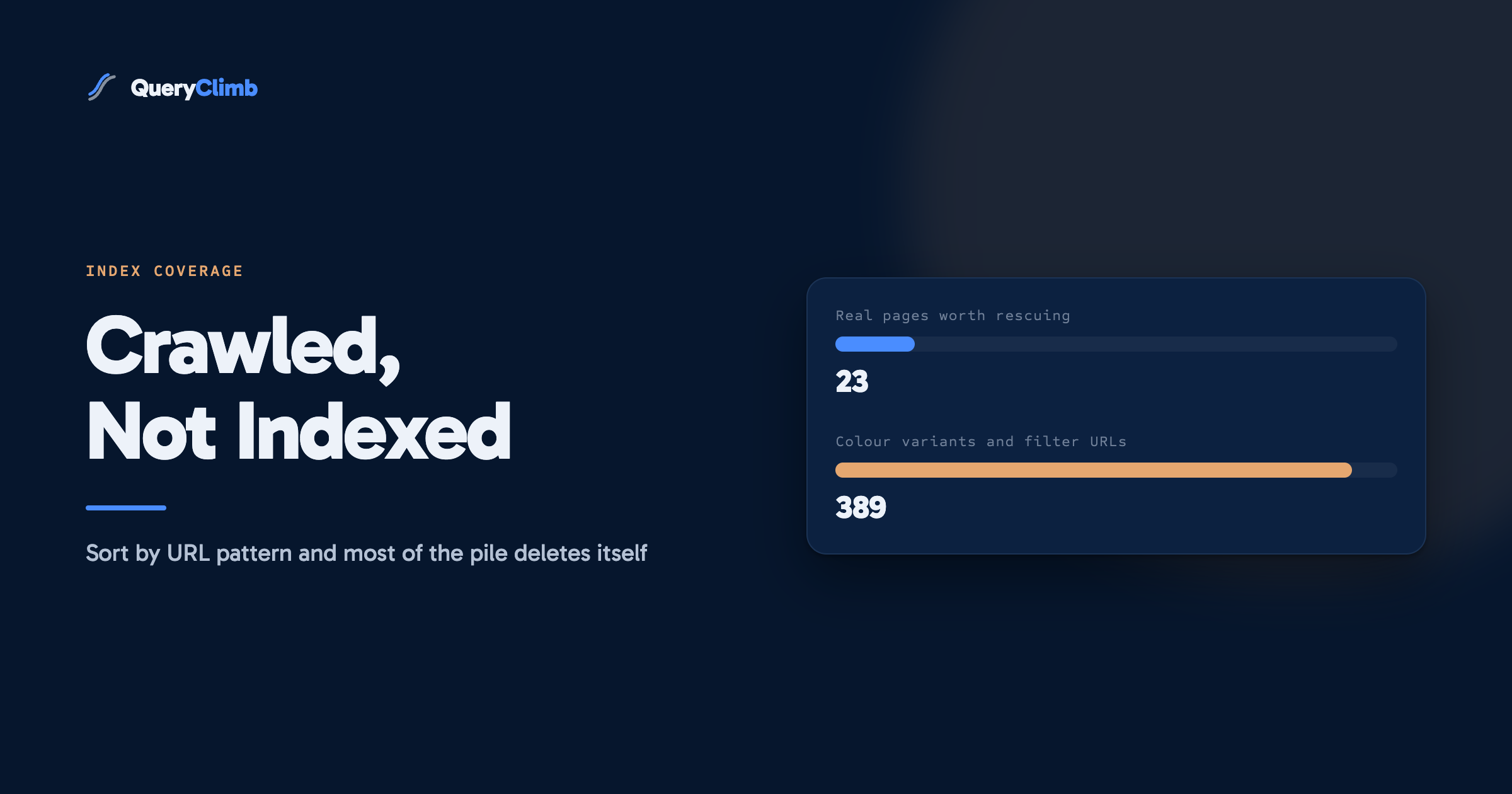
Crawled, currently not indexed means Googlebot fetched your page, read it, and decided it was not worth keeping. It is a quality judgement rather than a technical fault, so there is no setting to change. On most stores the majority of these URLs should be deleted or consolidated, and only a small remainder is worth rescuing.
Google fetched the page, read it, and decided not to store it. That is the whole of what “crawled, currently not indexed” means. It is a judgement about the page rather than a fault in your site, which is why there is no broken tag to find and no setting to flip.
That makes it the most misread line in the Page Indexing report. It sits in a list next to genuine failures like server errors and noindex directives, so it reads as something gone wrong. The first time we opened that report on our own store we had a few hundred URLs under it and assumed we had misconfigured something. We had not. Most of those pages did not deserve to be in the index, and the useful work turned out to be deleting them rather than pleading for them.
What does “crawled, currently not indexed” actually mean?
Googlebot requested the URL, received a normal response, parsed the content, and then chose not to add it to the index. Google’s own documentation for the report is careful to say the page may or may not be indexed later, and tells you there is no need to resubmit the URL for crawling.
Two neighbouring statuses get confused with it constantly, and separating them is the first thing to do.
Discovered, currently not indexed means Google knows the URL exists but has not fetched it yet. That is a crawl scheduling question, and it points at site speed, sitemap size or a very large URL space.
Excluded by noindex tag means you told Google to stay away and Google obeyed. That is a directive you control, and if it appears on a page you wanted indexed, you have a bug.
Crawled, currently not indexed is the only one of the three where Google looked at the content and was unimpressed. Treating it as a technical error sends you hunting for a cause that does not exist.
Why does Google crawl a page and then decide not to index it?
Because storing and serving a page costs Google money, and the page did not make the case. Google’s crawl budget guidance is unusually direct about this. It states that low-value-add URLs harm a site’s crawling and indexing, and it names faceted navigation, on-site duplicate content, soft error pages and low quality content as the usual sources.
On a store selling outdoor kit, those sources have very predictable shapes:
- The same waterproof jacket in five colours, published as five product pages carrying one shared description and a different swatch image.
- Filter and sort combinations, so
/collections/waterproofs?sort_by=price-ascendingand the same collection filtered to size medium both become crawlable URLs. - Blog posts of 300 words on subjects the manufacturer’s own care page already covers properly.
- Pages nothing on the site links to, reachable only because they are listed in the sitemap.
- Two guides answering the same question, where the second was written because nobody checked whether the first existed.
That last one is the same failure as keyword cannibalisation, arriving through a different door. When two of your pages compete, sometimes Google picks a winner and demotes the loser. Sometimes it declines to index the loser at all.
What the data showed us
When we sorted our own unindexed list by URL pattern rather than reading it top to bottom, the shape of the problem changed completely. Roughly nine in ten were parameter variants of collection pages that existed for shoppers using filters and had never been intended as landing pages. The handful of genuine articles in the pile was small enough to review by hand in an afternoon. Sorting by pattern took two minutes and saved a week of the wrong work.
Is Google wrong, or is the page?
Usually the page, and accepting that early saves months. The instinct is to treat every unindexed URL as a page being unfairly denied traffic. On most stores it is closer to the reverse: the site is producing more URLs than it has distinct things to say, and Google is declining the surplus.
There is a real exception. If pages that clearly deserve indexing are sitting in the pile, something structural is wrong, and the usual culprits are internal linking depth and duplication rather than the pages themselves. A guide with one link pointing at it from a paginated blog archive looks, to a crawler, exactly like a page the site does not care about.
The test is not whether you can find one good page in the list. It is what the ratio looks like. If nearly all of them are variants and thin pages, the site has a publishing problem. If a meaningful share are real articles and real products, the site has a linking problem.
How do you tell a page worth rescuing from one worth deleting?
Three questions, in this order, and the first no ends it.
Would you link to it from your own navigation? Not the sitemap, which lists everything by default. If you would not put it in a menu, a collection or the body of another article, you are asking Google to value a page you do not.
Does it say anything the rest of the site does not? Open the page next to your best page on the same subject. A reproofing guide that repeats what the jacket’s product page already says is not a second chance at the query, it is a second copy.
Can you name the search behind it? Say the actual query out loud. “How to reproof a waterproof jacket” is a search. “Waterproofs, blue, size medium, sorted by price” is a filter state. If you cannot name the search, the page does not need to be indexed and quite possibly does not need to exist.
A page that survives all three is worth rescuing. In our experience that is a small minority of the list, and the work on those is ordinary: give it more internal links, make it genuinely better than the page it duplicates, or merge the two.
What do you do with the pages that should not exist?
Remove them, and pick the removal method by whether a human still needs the page.
Nobody needs it. Delete it and return a 404 or 410. Google will drop it from the report on its own. This is the right answer for retired products with no replacement, old campaign pages and duplicated posts. We have written before about why most dead URLs should stay dead rather than being redirected to the homepage, and the same logic applies here: a redirect to something irrelevant converts a clean removal into a soft 404, which is its own line in the same report.
Shoppers need it, search does not. This covers filter URLs, sort orders, internal search results, cart and account pages. Add a noindex tag. Google’s documentation on blocking indexing covers the mechanics.
Another page says it better. Consolidate. Point a canonical at the page you want to win, or merge the content and delete the loser. Our post on content refreshes covers when merging beats writing something new.
Worth knowing
Do not block a URL in robots.txt and add a noindex tag to it at the same time. Googlebot has to fetch the page to see the noindex, and a robots.txt disallow stops it fetching, so the directive is never read. Pick one. If you want a page out of the index, allow the crawl and let the tag do its job.
What actually gets a good page indexed?
Links from pages Google already values, more than anything else you can do to the page itself. A page reachable in one click from a collection that ranks is treated very differently from a page reachable only through page four of a blog archive.
The other half is being worth indexing on the terms Google publishes. The helpful content guidance is a set of questions about whether the page offers original information and first-hand experience. A reproofing guide written by someone who has actually put three different wash-in treatments through a wet winter passes that. A summary of the manufacturer’s instructions does not, however well formatted it is.
Practically, for a page you have decided to rescue:
- Link to it from two or three relevant pages that are themselves indexed, in body copy rather than a footer.
- Add what only you have. Photographs of the actual product, results from actually using it, the question customers keep emailing about.
- Cut the overlap with your other pages until the two are genuinely about different searches.
None of that is fast. Indexing decisions are re-evaluated on Google’s schedule, and the honest expectation is weeks.
Does clicking “Request indexing” help?
Almost never, and it is where most of the time gets wasted. The URL Inspection tool will happily let you request indexing for a page Google has already crawled and rejected. What it does is queue a re-crawl. Google then re-reads the same page and reaches the same conclusion, because nothing about the page changed.
Requesting indexing is worth doing exactly once, after you have made a real change to the page and want Google to see it sooner than it otherwise would. Doing it on an unchanged page is a way of feeling busy.
The same applies to the Validate Fix button on the report. It is useful when you have fixed something. On a batch of URLs you have not touched, it starts a validation that will fail in a fortnight and tell you nothing.
Key takeaway
Sort the list by URL pattern before you read a single page. Nearly every store finds that one or two patterns account for most of the pile, and those patterns need one decision each rather than hundreds. The remainder, the real pages, is usually small enough to triage by hand in an afternoon.
How do you stop the pile rebuilding?
By deciding what a page is for before publishing it, which sounds obvious and is the step almost everyone skips. Every page we now publish has a named query behind it and a check that no existing page already targets that query. That single habit did more for our indexing rate than any technical fix.
The manual version works and costs nothing. Pull your queries from Search Console, group them, check each candidate against what you have already published, and write only where there is a gap. That loop is the whole of our blog SEO system, and the striking distance list is where most of the good candidates come from.
What it costs is hours, every month, forever. That is the gap QueryClimb fills rather than any technical trick: Search Insights does the grouping and the overlap check against your existing pages, the content calendar holds the decisions so the same page does not get written twice, and internal linking keeps new pages from landing four clicks deep with nothing pointing at them. You can see what running that loop did to a real store in our case study, and the pricing is public. If you have the hours, do it by hand.
Frequently asked questions
How do I fix crawled, currently not indexed?
For most URLs you do not fix it, you remove them. Sort the list by URL pattern, delete or noindex the variant and filter URLs that make up the bulk of it, then treat the small remainder of real pages individually with more internal links and genuinely distinct content.
Is crawled, currently not indexed an error?
No. It appears in the Page Indexing report next to real errors, but nothing is broken. Google fetched the page successfully and made a decision about its value. The report is telling you an outcome, not a fault.
How long does it take to get indexed after crawled, currently not indexed?
Weeks, if it happens at all. Google re-evaluates on its own schedule and gives no guarantee the page will ever be indexed. If the page has not changed, expect the same answer indefinitely.
What is the difference between crawled and discovered, currently not indexed?
Discovered means Google knows the URL exists but has not fetched it, which usually points at crawl scheduling or a very large URL space. Crawled means Google fetched and read the page, then chose not to index it, which points at the content.
Does crawled, currently not indexed hurt the rest of my site?
Not directly, and a handful of them is normal on any site. A large pile is worth acting on because it usually signals the site is generating far more URLs than it has distinct things to say, and Google’s own crawl budget guidance says low-value URLs affect how the rest of the site is crawled.